Citylight: A Casual Display Font That Balances Simplicity and Style
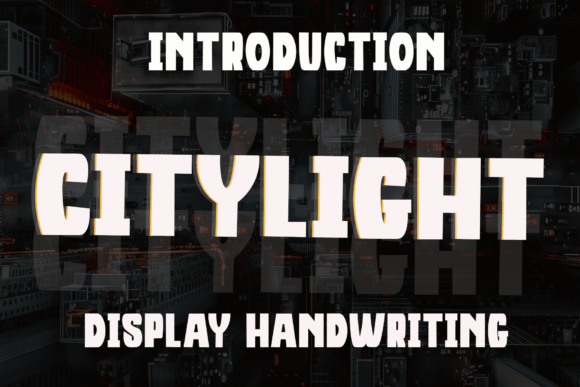
When it comes to choosing the right font for a design project, many creators look for a balance between personality and professionalism. Citylight is a display font that hits that sweet spot. With its clean lines, subtle curves, and friendly appearance, it’s a go-to choice for branding, packaging, headlines, and digital content. It’s designed to feel approachable while maintaining a modern, polished edge—perfect for projects that need warmth without sacrificing clarity.
Why Designers Love Citylight
Citylight stands out because it mimics the feel of modern handwritten typography without looking messy or unrefined. Its balanced letterforms and crisp structure make it easy to read at a glance, which is especially important for headlines and short-form text. Whether you're designing a logo, a product label, or a social media graphic, Citylight adds a touch of warmth and accessibility that resonates well with audiences.
It’s particularly popular among small business owners, bloggers, and independent creators who want to convey authenticity and approachability. The font’s versatility also makes it a favorite among marketers and designers who work across both print and digital mediums.
Common Mistakes When Using Citylight
Despite its popularity, there are several common mistakes people make when choosing or using Citylight. These can impact the effectiveness of a design, the readability of text, or even the legal compliance of a project. Here’s a look at what to watch out for—and how to avoid these pitfalls.
1. Using Citylight for Long-Form Body Text
Citylight is a display font, which means it's best suited for short bursts of text like headlines, titles, or callouts. Some users mistakenly apply it to paragraphs or large blocks of body text, which can reduce readability and strain the eyes.
Better approach: Use Citylight for visual impact in headings or logos, and pair it with a simpler, more legible sans-serif or serif font for body content.
2. Not Checking Licensing Before Downloading
One of the most overlooked aspects of font use is licensing. Some designers download Citylight from third-party sites without verifying whether the license allows for commercial use or web embedding. This can lead to legal issues or unexpected costs later on.
Better approach: Always check the licensing terms directly from the official source or a trusted font marketplace. Make sure it covers your intended use—whether it’s for a personal blog, a client’s branding, or a product package.
3. Over-Rounding the Kerning
Citylight’s rounded edges give it a soft, friendly appearance. However, some designers overdo the spacing—either too tight or too loose—which can make the text look unbalanced or harder to read.
Better approach: Stick to the default kerning unless you have a clear reason to adjust it. If you’re using it in a logo or headline, test it at different sizes and spacing to ensure legibility across devices and print formats.
4. Assuming It Works for Every Brand Personality
While Citylight has a warm and inviting vibe, it may not be the best fit for every brand. For example, a luxury brand or a high-tech startup might find that Citylight’s casual tone doesn’t match their professional or upscale image.
Better approach: Consider the tone of your brand or message before choosing Citylight. If you’re aiming for a clean, modern look with a bit of personality, it’s a great fit. If you need something more formal or minimalist, explore other options.
What to Check Before Choosing Citylight
Before you commit to using Citylight in your design project, here are a few practical checks to run:
- Font Weight Options: Does the family include bold, light, or italic variants? Having multiple weights gives you more flexibility in design.
- Character Set: Make sure it supports the languages or special characters you need, especially if your content includes accents or symbols.
- Web Compatibility: If you're using Citylight on a website, confirm that it’s web-optimized and performs well in terms of load time and rendering.
- Test Across Sizes: Preview how it looks at different sizes—especially on mobile screens or printed materials.
Pairing Citylight with Other Fonts
One of the best ways to enhance the impact of Citylight is by pairing it with a complementary font. Since it’s a display font, combining it with a more neutral body font can improve readability and visual hierarchy.
Example pairings:
- Citylight + Lato: Clean and modern, this combination works well for digital content and branding.
- Citylight + Merriweather: Great for editorial or blog designs where you want a mix of personality and readability.
- Citylight + Montserrat: A strong pairing for logos and promotional materials that need both charm and clarity.
When to Choose a Different Font
Citylight is versatile, but it’s not always the best choice. Here are a few situations where you might want to consider alternatives:
- If you're designing for a formal or technical audience, such as legal documents or scientific reports.
- If you need a font that’s optimized for very small text, like footnotes or captions.
- If your project requires extremely high contrast or stylized letterforms that Citylight doesn’t offer.
Final Thoughts
Citylight is a well-crafted display font that brings a modern, handwritten feel to any design. Its clean structure and friendly appearance make it a go-to for branding, headlines, and packaging. But like any design tool, it works best when used thoughtfully. Avoiding common mistakes—like using it for long-form text or ignoring licensing—can save time, reduce frustration, and improve the final outcome.
Whether you're a small business owner creating a logo or a blogger designing a social media post, Citylight offers a balance of charm and clarity. Just remember to pair it wisely, test it thoroughly, and make sure it aligns with your brand’s tone and purpose.