Jumping Rabbit: A Playful Font Set for Creative Designs
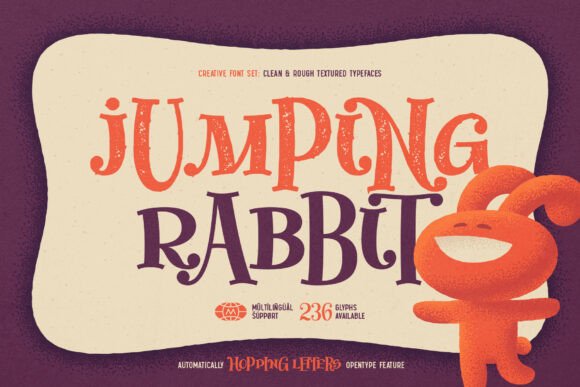
Jumping Rabbit is not just another font — it’s a creative tool designed to bring energy and originality to your visual projects. With its cartoon-style, hopping letters, this font set delivers a cheerful, childlike vibe that works across a variety of design contexts. Whether you're crafting a logo, designing a poster, or working on digital content, Jumping Rabbit adds a unique personality that stands out without overwhelming the message.
The set includes two distinct fonts: Clean Regular and Textured Rough. Each offers a different aesthetic — one smooth and polished, the other with a hand-drawn, rough texture. Both fonts contain 236 glyphs and support multiple languages, making them versatile for international use. The real magic, however, lies in the OpenType feature that automatically alternates letter casing as you type. This dynamic function adds visual rhythm and movement to your text, helping you achieve a more engaging layout with minimal effort.
How Jumping Rabbit Enhances Design Creativity
One of the standout features of Jumping Rabbit is how it simplifies the process of creating lively, expressive typography. Designers often spend time manually adjusting letter spacing, case, and style to achieve a playful look. With Jumping Rabbit, the Contextual Alternates feature automates this process, giving your text a naturally varied appearance that mimics hand-lettering. This saves time and reduces the need for post-typing adjustments, especially useful when working on tight deadlines.
For illustrators, educators, and content creators, this font offers a fresh alternative to standard cartoon-style typefaces. The hopping motion embedded in each letterform makes it ideal for children’s books, educational materials, and animated branding projects. Even if your work isn’t directly aimed at children, the font’s energetic tone can help convey a sense of fun and approachability — a valuable asset in marketing, social media, and branding.
Practical Benefits for Designers and Content Creators
Jumping Rabbit’s dual-font structure gives you more design flexibility. Clean Regular works well for digital use, such as web banners or app interfaces, where clarity and consistency matter. Textured Rough, on the other hand, adds a tactile, organic feel perfect for print materials like greeting cards, packaging, or handmade product labels. Having both options in one set allows you to maintain visual continuity across different media while adapting to the specific tone of each project.
Another practical benefit is multilingual support. With 236 glyphs per font, Jumping Rabbit covers a broad range of characters, including accents and special symbols. This means you can confidently use the font for international projects without worrying about missing characters or inconsistent rendering across platforms. It’s a small but crucial detail that can prevent layout issues and save time during localization.
When and Why to Use Jumping Rabbit
Jumping Rabbit shines in projects that benefit from a whimsical or lighthearted tone. It’s particularly effective for:
- Children’s media: Books, apps, and educational materials gain a more engaging look.
- Branding for creative businesses: Toy stores, art studios, and lifestyle brands can use the font to reinforce a fun, imaginative identity.
- Social media content: Captions, quotes, and promotional graphics become more eye-catching and shareable.
- Print-on-demand products: T-shirts, mugs, and stickers gain a unique, expressive edge.
If you’re a freelancer or small business owner managing multiple design tasks, Jumping Rabbit offers a ready-made solution that requires minimal customization. It’s especially useful if you’re using design software that supports OpenType features — enabling you to generate dynamic text without manual intervention. Just type, and the font does the rest.
Considerations and Best Practices
While Jumping Rabbit brings many creative benefits, it’s important to use it thoughtfully. Like any expressive font, it may not be suitable for formal or technical contexts. Long blocks of body text, for example, can become difficult to read due to the irregular shapes and spacing. Instead, use it for headlines, titles, logos, and short bursts of text where visual impact is key.
Also, make sure your design software supports the Contextual Alternates feature. Programs like Adobe Illustrator, Photoshop, and InDesign handle this well, but some simpler tools may not. If you're unsure, test the font in your preferred application before committing to a large project.
When pairing Jumping Rabbit with other fonts, opt for clean, minimalist typefaces that provide contrast without competing for attention. Sans-serif fonts like Montserrat, Lato, or Open Sans work well as secondary choices, balancing the playful nature of Jumping Rabbit with a more structured appearance.
Final Thoughts
Jumping Rabbit is more than a novelty font — it’s a practical design asset that helps you infuse personality into your work. Whether you’re creating for kids, building a brand with a playful edge, or simply looking for a fresh typographic option, this font set offers both visual appeal and functional benefits. Its built-in OpenType features, dual-style format, and multilingual support make it a smart choice for a wide range of creative professionals.
If you're ready to add a touch of whimsy to your next design project, give Jumping Rabbit a try. With its intuitive design and flexible use cases, it might just become your go-to font for projects that need a little extra bounce.