Sunshine Spooky: A Playful Font for Lighthearted Halloween Designs
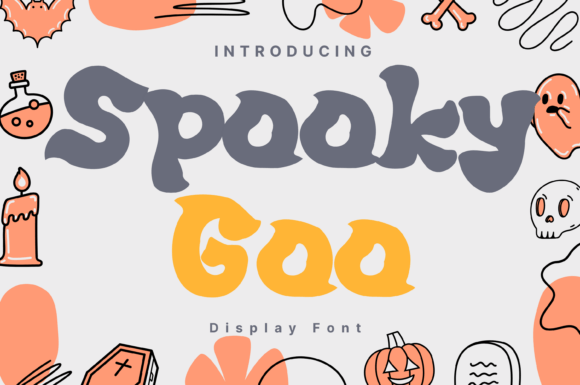
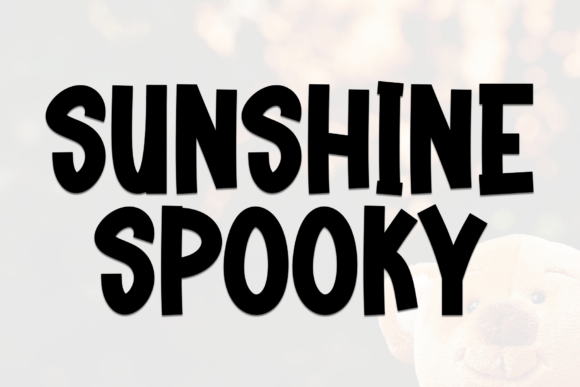
When it comes to Halloween design, the tone can vary dramatically—from eerie and terrifying to whimsical and cute. For designers, marketers, and educators who want to lean into the latter, Sunshine Spooky offers a unique visual voice. This hand-drawn, chunky font blends cheerful and creepy elements, making it ideal for Halloween-themed projects that maintain a lighthearted, family-friendly tone.
Whether you're creating invitations for a trick-or-treat event, designing classroom crafts, or producing fall decor for a small business, Sunshine Spooky adds a cartoonish twist that stands out without being overwhelming. Its bold, quirky letterforms are easy to read and visually engaging, especially for younger audiences or casual branding contexts.
Understanding the Role of Sunshine Spooky in Design Workflows
In the broader design process, typography plays a crucial role in setting the tone and guiding user perception. Sunshine Spooky fits best in the creative phase, where mood and message are being defined. It's not a font for every project—but when the goal is to evoke playful spookiness, it becomes a powerful asset.
Designers often start with a concept board or mood map before selecting visual elements. At this stage, choosing a font like Sunshine Spooky signals a clear creative direction. It pairs well with illustrations, icons, and color palettes that include pumpkins, ghosts, bats, and autumn leaves, especially when those visuals are stylized rather than realistic.
Once the font is selected, it integrates smoothly into common design tools such as Adobe Illustrator, Canva, Figma, or Procreate. Its hand-drawn texture gives a tactile, organic feel that digital fonts often lack, making it especially effective for print-based Halloween crafts or digital marketing materials aimed at children.
How Sunshine Spooky Fits Into Real-World Projects
Let’s look at a few practical use cases where Sunshine Spooky enhances both the design and the user experience:
- Classroom Crafts: Teachers planning Halloween-themed activities can use Sunshine Spooky to create signs, worksheets, and bulletin board elements that feel festive yet age-appropriate.
- Event Invitations: For a family-friendly costume party or neighborhood trick-or-treat event, this font adds charm and readability to digital or printed invites.
- Kids’ Costume Labels: Small businesses selling Halloween costumes or accessories can use the font for packaging, tags, and promotional materials to appeal to younger customers.
- Whimsical Fall Decor: From mugs to greeting cards, Sunshine Spooky works well in product design where a fun, spooky aesthetic is desired.
In each of these scenarios, the font supports the creative goal while maintaining usability. It’s important to note that Sunshine Spooky should be used thoughtfully—its boldness and texture mean it works best at medium to large sizes and should be balanced with simpler fonts for body text or subheadings.
Integrating Sunshine Spooky with Other Tools and Platforms
One of the biggest advantages of Sunshine Spooky is its compatibility with a wide range of design platforms and workflows. Whether you're a professional designer or a small business owner using a drag-and-drop tool, you can easily incorporate this font into your projects.
For users of Adobe Creative Cloud, installing Sunshine Spooky as a custom font is straightforward and works seamlessly in Photoshop, Illustrator, and InDesign. Canva users can upload the font if they have a Pro account or use it if it's added to the platform's font library. Similarly, Figma supports custom fonts, allowing teams to maintain brand consistency across Halloween-themed UI designs or marketing assets.
When working in collaborative environments, it's important to ensure that all team members have access to the same font file or that the font is embedded properly in shared files. This helps avoid display issues and ensures visual consistency across devices and platforms.
Workflow Tips for Using Sunshine Spooky Effectively
While the font has a strong visual personality, it's most effective when used with intention. Here are some practical tips for integrating Sunshine Spooky into your design workflow:
- Pair with Simpler Fonts: To maintain readability and visual balance, pair Sunshine Spooky with a clean sans-serif or a complementary script font for subheadings and body text.
- Use for Emphasis, Not Long Text: Due to its decorative nature, it’s best used for headlines, titles, and callouts rather than long paragraphs.
- Test Across Devices: Especially for digital projects, preview how the font looks on mobile and desktop screens to ensure legibility and impact.
- Consider Color and Contrast: The font’s texture works well with warm autumn tones like orange, black, and deep purple. Ensure there’s enough contrast between text and background for readability.
- Keep File Organization Consistent: Store font files in a shared asset folder or cloud drive to ensure all team members can access them without licensing issues.
Long-Term Use and Branding Considerations
If you're using Sunshine Spooky as part of a seasonal brand identity—such as a fall product line or annual Halloween campaign—consider how it fits into your broader visual language. While it’s perfect for Halloween, its playful tone may not align with other seasonal themes like winter holidays or spring promotions.
That said, if your brand leans into whimsy and humor year-round, you might find creative ways to repurpose the font in other seasonal campaigns. Just be sure to maintain consistency in how it’s used—always in headlines, always in a specific color scheme, or always paired with certain imagery.
From a licensing standpoint, always verify that the font usage aligns with your project’s scope. If you're using it for commercial purposes, make sure you have the appropriate license, especially when distributing the font in digital or printed materials.
Final Thoughts: Making the Most of Sunshine Spooky
Sunshine Spooky is more than just a Halloween font—it's a design tool that brings a specific mood and personality to your projects. Whether you're designing a classroom activity, a product label, or a digital invitation, this font helps communicate fun, creativity, and a touch of spooky charm.
By understanding where and how it fits into your workflow, you can use Sunshine Spooky effectively without overdoing it. Pair it wisely, use it purposefully, and test it thoroughly to ensure it enhances your design rather than complicates it.
As with any creative asset, the key is to integrate it thoughtfully into your process. When done right, Sunshine Spooky doesn't just make your Halloween designs look better—it makes them feel more alive.